
Key takeaways
- Both platforms are good. The right choice depends on whether your team thinks in visual boards or structured task hierarchies.
- monday.com generally wins for cross-functional, client-facing and CRM-style work where visual flexibility matters most.
- Asana generally wins for process-driven teams such as marketing, product and engineering, where goals, dependencies and rules-based automation matter.
- monday.com enforces a three-seat minimum on paid plans. Asana does not, which changes the real cost for very small teams.
- The switching cost is rarely the data migration. It is whether the new workflow is actually redesigned rather than recreated on a different platform.
Both platforms are genuinely good. The right choice depends on how your team works, not on which one has more features. Pricing and plan details change often, so verify current rates before you budget. The structural differences below are stable.
Which platform is the short answer for your business?
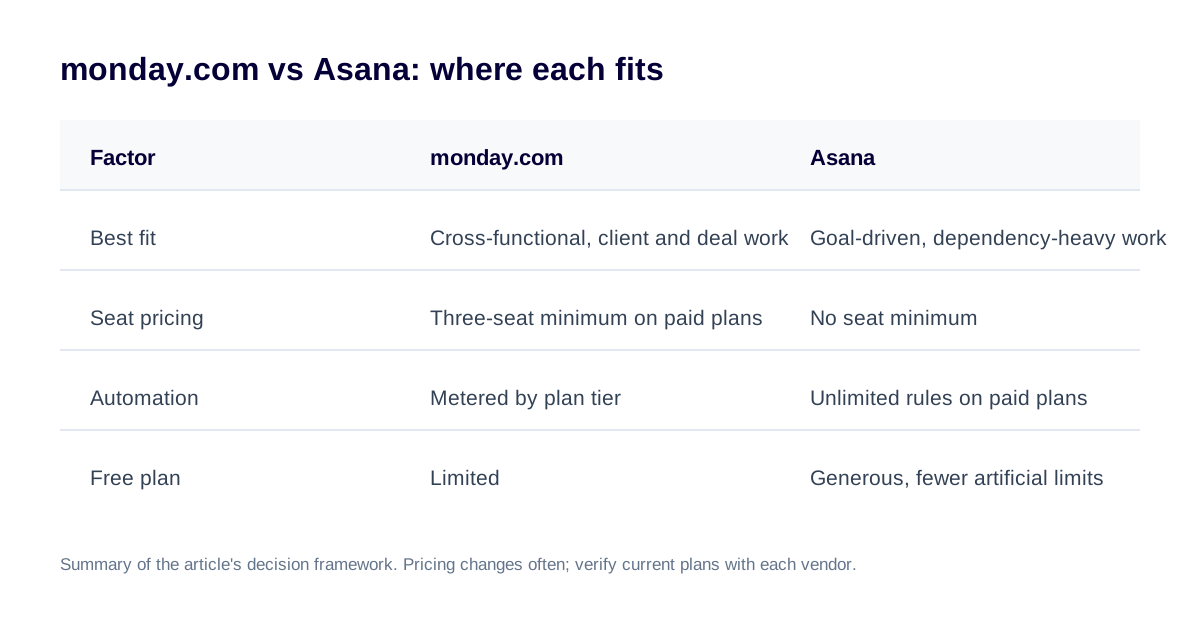
If your work is cross-functional, visual and client- or deal-facing (sales pipelines, client onboarding, operations that span multiple departments), monday.com is usually the better fit. If your work is process-driven with clear goals, dependencies and structured task hierarchies (marketing campaigns, product roadmaps, engineering sprints), Asana is usually the better fit. Most businesses that ask this question already lean towards one of those work styles. The rest of this article is about confirming which one you are, not talking you out of it.
How are the two platforms different in philosophy?
monday.com starts from a blank, colourful grid and lets you shape it into almost anything: a CRM, a content calendar, an inventory tracker, a client portal. That flexibility is the product philosophy. Asana starts from the opposite direction. Tasks live inside projects, projects can have dependencies and goals attached, and the structure is far more opinionated about how work is organised. Neither approach is more advanced than the other. They are built for different kinds of teams.
monday.com is a blank canvas you shape into a system. Asana is a structured system you fill with work.
Where does monday.com win?
- Cross-functional visibility. One board can show sales, delivery and finance stages side by side without forcing every department into the same task structure.
- Client- and deal-facing systems. monday CRM and client-onboarding boards are easier to make presentable to people outside the company.
- Visual flexibility for non-standard processes. Approval chains, intake forms and custom statuses are simple to configure without engineering help.
- Faster time to first value for non-technical teams. A capable admin can build a usable board in a day.
Where does Asana win?
- Structured, goal-driven process work. Campaign timelines, product roadmaps and sprint cycles benefit from Asana's native goals and dependency tracking.
- Automation depth on lower-tier plans. Asana includes unlimited automation rules on its paid plans, where monday.com meters automation actions by plan tier.
- Teams that outgrow simple boards fast. Nested subtasks, multi-homing tasks across projects and portfolio-level reporting are more mature in Asana out of the box.
- Free-plan generosity. Asana's free tier has fewer artificial limits, which matters for a small team validating the platform before buying.
Which one is more expensive?
It depends on team size and plan, and pricing moves often, so treat any figure as a starting point and verify it. The structural difference is stable. monday.com's paid plans enforce a three-seat minimum, so a two-person team pays for three seats. Its Standard plan caps automation at a shared monthly action limit that Pro removes at a higher price. Asana has no seat minimum, so a solo user or a two-person team pays only for what they use, and unlimited automation rules are included on its paid tiers.
The net effect: for very small teams, or automation-heavy workflows on a budget, Asana's pricing is often more forgiving. For larger cross-functional teams where the per-seat gap narrows, the platform-fit question matters more than the price difference.
Which platform fits your team? A decision framework
Skip the feature checklist. Match your situation to the row that fits.
| If this is you | Lean towards |
|---|---|
| You are building a sales pipeline, CRM or client-facing operations system | monday.com |
| You run structured campaigns, product roadmaps or sprint cycles with dependencies | Asana |
| Your process spans multiple departments with very different workflows on one board | monday.com |
| You need automation depth without paying for a higher tier | Asana |
| You want a non-technical admin to build and adapt boards quickly | monday.com |
| You are a small team validating the platform before committing budget | Asana (free plan) |
| You need heavy portfolio-level reporting across many nested projects | Asana |
| You need something client-presentable with minimal setup effort | monday.com |
What if you are already on one and considering the other?
The switching cost people worry about is almost never the data migration itself. Projects, tasks, custom fields and history map reasonably well between the two platforms. The real risk is recreating the old, possibly broken workflow on the new tool instead of redesigning it properly. A migration is a chance to fix the process, not just move it. Treating it as a straight lift-and-shift is the most common way a platform switch fails to deliver the improvement everyone expected. If you are weighing a move, see our Asana to monday.com migration service.
Where do we land?
We are a monday.com Authorized Partner, so expect some bias. We still recommend Asana to some clients, and we would rather say that directly than pretend every project fits one platform. If your work is genuinely cross-functional, visual and client-facing, we build it on monday.com, which is usually the stronger long-term platform for the operations and automation work we specialise in. If your team runs structured, goal-driven, dependency-heavy work, particularly marketing or product teams, we will say so and help you get the most out of Asana instead. The wrong call is not picking the "other" platform. It is picking either one without matching it to how your team actually works.
Frequently asked questions
Is monday.com more expensive than Asana?
It depends on team size and plan. monday.com enforces a three-seat minimum on paid plans, so very small teams often pay more per person than on Asana, which has no seat minimum. At mid-size and automation-heavy usage, the gap narrows or reverses depending on which tier each side needs. Verify current pricing directly with each vendor before budgeting, since both change plans periodically.
Can you migrate from Asana to monday.com without losing data?
Yes, with proper planning. Projects, tasks, custom fields and history can be mapped and migrated. The real risk is rarely the export itself. It is redesigning the workflow properly on the new platform rather than recreating the old one.
Which platform is better for a marketing team?
Marketing teams running structured campaigns with clear timelines, dependencies and goals tend to do well on Asana. Teams that need a highly visual, client-presentable system spanning content, approvals and cross-team handoffs often prefer monday.com. The deciding factor is usually how structured versus visual the team's existing process already is.
Which platform is better for a small agency or client-services business?
monday.com tends to win here, because client-facing boards, intake forms and CRM-style pipelines are easier to make presentable and adapt per client without engineering support.
Do you need to be technical to set up either platform well?
No. A well-designed implementation on either platform benefits from mapping the actual workflow, including exceptions, before building anything. That is the same principle that separates durable implementations from ones that stall, whichever platform is chosen.
Not sure which one fits your team?
A platform-fit consultation is a short, honest conversation about how your team actually works, not a sales pitch for whichever platform we sell more of. We will tell you straight, including if the answer is "stay where you are".
Book a platform-fit consultation