
Key takeaways
- A monday CRM that holds up is built on three connected boards (Deals, Contacts and Companies), not one board with forty columns trying to do everything.
- The automations that matter remove typing: stage-change notifications, stale-deal alerts and auto-created follow-up tasks.
- Most abandoned monday.com CRMs fail for one of three reasons: a single mega-board, no separation between activity logging and deal stage, and manual entry lag that erodes trust in the forecast.
- For many teams under roughly 30 to 40 reps, monday CRM is a capable replacement for Salesforce or HubSpot, not just a budget option.
- A properly scoped build takes two to four weeks, not a weekend.
Your CRM is not broken. Your process for using it is. That is the finding behind almost every "our CRM does not work" conversation we have with sales leaders. The platform is rarely the problem. What is usually missing is a data structure that matches how deals actually move, and automation that removes typing instead of just displaying it. Here is the architecture that holds up.
How do you start: with your pipeline stages or with monday.com?
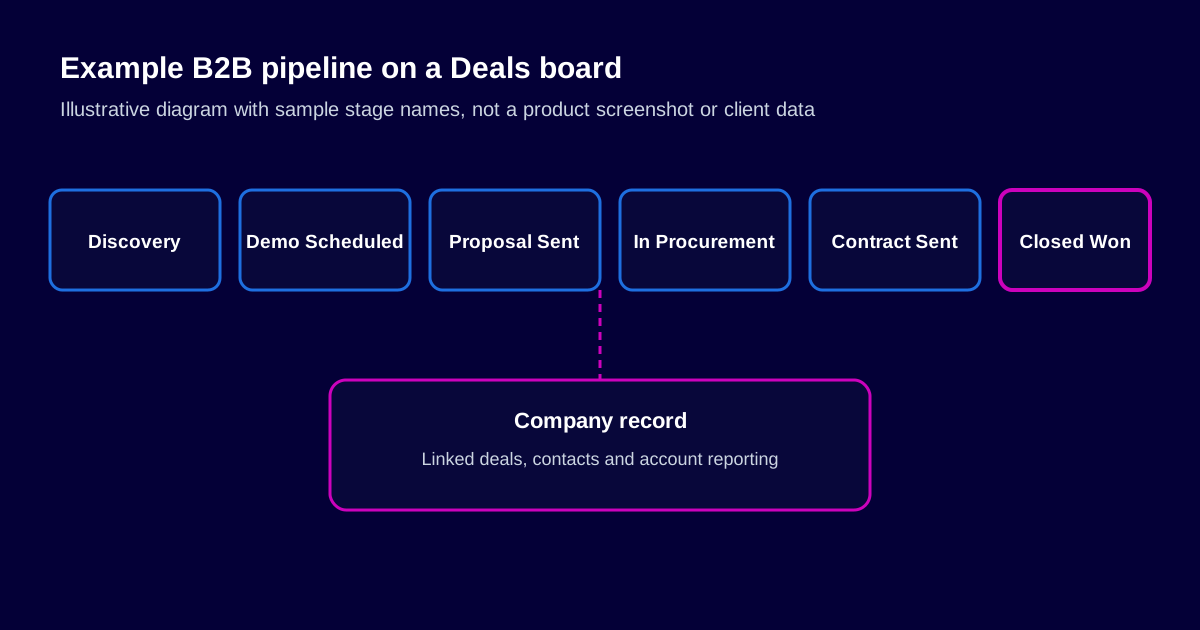
Start with your real sales stages, before you touch monday.com. Not the five generic stages in a template, but the ones your team actually means when they say a deal is "in legal" or "waiting on procurement". Most B2B pipelines have six to eight real stages, and the wording matters. Reps will not consistently update a stage whose label does not match how they already describe the deal out loud. If your team says "in procurement", the board should say "In Procurement", not "Negotiation". That is not a cosmetic detail. Mismatched language is one of the quiet reasons reps stop updating a CRM.
What data structure actually holds up?
The biggest mistake in monday CRM builds is putting everything on one board. A board with forty columns trying to track deal stage, contact details, company information and activity history becomes unusable within a month. The structure that holds up is three connected boards:
- Deals board: one row per opportunity, tracking stage, value, close date and owner, connected to the Contacts and Companies boards rather than duplicating their data.
- Contacts board: one row per person, connected to every deal and company they are associated with, so contact details live in exactly one place.
- Companies board: one row per account, showing every deal and contact tied to it. This is what makes account-level reporting possible at all.
Connected boards mean a contact's details only have to be updated once, however many deals they are tied to. That is the difference between a CRM people trust and one where nobody is sure which copy of a phone number is current.
Which automations are worth building first?
Skip the automations that look impressive in a demo and build the ones that remove typing:
- Stage-change notifications. The deal owner and their manager are notified when a deal moves stage, instead of a manager having to check the board.
- Stale-deal alerts. Any deal that has not moved stage or received an update within a defined number of days is flagged automatically. This is what keeps a pipeline honest.
- Auto-created follow-up tasks. Entering a stage such as "Proposal Sent" creates the next action item, so the rep does not have to remember.
- Lead routing. New inbound leads are assigned automatically by territory, deal size or round-robin rules, instead of sitting in an inbox waiting to be triaged.
None of these are exotic. They are the automations that make a CRM feel like it is doing part of the job, rather than being a place where the job gets recorded after the fact.
What are the three real mistakes?
1. One mega-board trying to be everything
This is the most common failure. A single board tracking deals, contacts, activity and reporting together becomes unmanageable as soon as one contact is tied to more than one deal.
2. No separation between activity logging and deal stage
Stage should show where a deal actually is in the process. Activity (calls made, emails sent, meetings held) is a different kind of data. It belongs in updates or a connected activity log, not in stage names like "Called 3x, following up". When activity and stage are mixed, the pipeline stops being a reliable picture of what is happening.
3. Manual entry lag that kills trust in the forecast
If updating a deal's stage takes longer than sending a Slack message about it, the Slack message wins. The same adoption principle that applies to implementations generally applies here. Once leadership catches the forecast being stale even once, they start asking for a manually compiled report "just to be safe", and the CRM has quietly lost its purpose.
A CRM three people ignore is not a system. It is a filing cabinet nobody opens.
What reporting will your executive team actually trust?
Dashboards fail for the same reason implementations fail generally: they answer the builder's questions, not the executive's. A sales dashboard that someone actually checks shows pipeline value by stage, deals at risk of stalling and forecast accuracy trends. It is not a wall of every column on the Deals board rendered as a chart. If the automations above are in place, the dashboard is only as good as the data feeding it. A dashboard built on manually updated, stale data will be ignored just as fast as the board it summarises.
Which integrations are worth doing first?
Three integrations account for most of the value in a CRM build, and they are worth doing before anything more elaborate: two-way email and calendar sync, so activity logs itself; Slack notifications for stage changes and stale-deal alerts, so the CRM surfaces problems instead of waiting to be checked; and a connection to whatever invoicing or accounting system closes the loop once a deal is won. Simple, high-frequency integrations like these are usually a good fit for Make.com. Anything involving conditional routing or several systems reacting to the same event is usually a better fit for n8n, as covered in our n8n vs Make comparison.
How long does a monday.com CRM build take?
A properly scoped build (mapping the real pipeline stages, structuring the connected boards, building the automations that matter and running a supported rollout) typically takes two to four weeks, depending on how many stages, integrations and edge cases the sales process has. Timelines that promise a fully built CRM in a day or two are usually skipping the mapping step, which is exactly the shortcut that produces a board nobody trusts by month three.
Frequently asked questions
Is monday CRM good enough to replace Salesforce or HubSpot for a small sales team?
For most teams under roughly 30 to 40 reps without highly specialised sales-engineering needs, yes. monday CRM covers pipeline management, contact and company tracking, automation and reporting well. Teams that need deep, industry-specific sales engineering or very mature revenue forecasting may outgrow it eventually, but that point is further off than most growing teams expect.
How long does it take to build a monday.com CRM properly?
A properly scoped build, including pipeline design, automation and a supported rollout, typically takes two to four weeks, depending on how many stages, integrations and edge cases the sales process has.
Can we migrate our existing CRM data into monday.com?
Yes. Contacts, companies, deals and their history can be mapped and migrated. The real risk is not the data move itself. It is recreating the old CRM's structure instead of fixing it, which is the same lesson that applies to any platform migration.
Will our sales reps actually use it, or will it end up like our last CRM attempt?
That depends almost entirely on whether stage names match how the team already talks about deals, and whether updating a stage takes less time than describing it in Slack. Adoption is a design outcome, not a willpower outcome.
Do we need Make or n8n to get a useful CRM, or does native monday.com automation cover it?
Native automation covers most of what a first build needs: stage notifications, stale-deal alerts and task creation. Make or n8n become useful once you connect the CRM to systems outside monday.com, such as accounting software or a marketing platform.
Want a CRM your sales team actually trusts?
A CRM build consultation starts with mapping your actual pipeline, stages and exceptions included, before a single board gets built. We will tell you honestly what a properly scoped build looks like for your process.
Explore monday CRM setup